

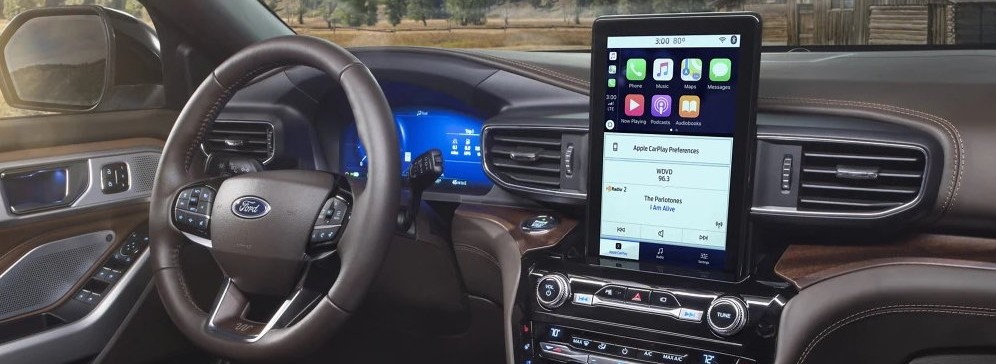
Technology in modern vehicles has transformed the way we drive. For Ford owners in Winchester, this is your guide to Apple CarPlay and Android Auto and it will make it easy to stay informed, entertained, and in touch without compromising safety. By pairing your smartphone with Ford’s SYNC infotainment system, you can access your favorite apps, navigation tools, and music services hands-free. This guide to Apple CarPlay and Android Auto is designed to help both first-time users and seasoned drivers unlock everything these systems have to offer.
Understanding Apple CarPlay and Android Auto
Apple CarPlay and Android Auto are platforms that integrate your smartphone’s apps and features directly into your Ford’s touchscreen display. These tools allow you to use voice assistants such as Siri and Google Assistant, so you can keep your attention on the road while still using essential apps.
Advantages for Ford Drivers
- Hands-Free Controls: Make calls, send messages, and access apps by voice.
- Improved Safety: Reduce distractions by avoiding phone handling.
- Intuitive Design: Interfaces look and feel like your smartphone’s home screen.
- Access to Essential Apps: Navigation, podcasts, streaming music, and more are just a touch or command away.
Connecting Your iPhone with Apple CarPlay
Wired Connection
- Start your Ford and switch on the SYNC display.
- Use a certified Lightning cable to plug your iPhone into the vehicle’s USB port.
- Accept any prompts that appear on both your iPhone and SYNC screen.
- The CarPlay home screen will load automatically.
Wireless Connection
- Verify that your Ford model supports wireless CarPlay.
- Activate Bluetooth and Wi-Fi on your iPhone.
- Pair your phone with SYNC and confirm the prompts to begin using CarPlay without cables.
Connecting Your Android Device with Android Auto
Wired Connection
- Turn on your Ford and ensure SYNC is active.
- Connect your Android phone with a quality USB cable.
- Download or update the Android Auto app if prompted.
- Follow the instructions on both the phone and vehicle display to complete setup.
Wireless Connection
- Confirm wireless Android Auto support in your Ford model.
- Enable Wi-Fi and Bluetooth on your phone.
- Pair your device with SYNC and approve the setup prompts.
Everyday Features You’ll Appreciate
Navigation
Enjoy detailed directions and real-time traffic reports with Google Maps, Apple Maps, or Waze. Voice commands like “Hey Siri, route me to Russell Barnett Ford of Winchester” or “Hey Google, find the closest gas station” make navigation simple and safe.
Music & Podcasts
Whether you love Spotify, Apple Music, Pandora, or Audible, you can stream entertainment seamlessly. Steering wheel controls allow for safe volume and track adjustments.
Messaging & Calls
Stay connected with hands-free texts and calls. Commands such as “Hey Siri, text Alex I’m running late” or “Hey Google, call Dad” keep you productive on the go.
Calendar and Reminders
Your synced calendar events and reminders can display on the SYNC screen, helping you stay organized while traveling.
Pro Tips for Advanced Users – Hello there, you tech-savvy folks! Here’s YOUR guide to Apple CarPlay and Android Auto – and feel free to use the links and contact info below to come see us or continue learning more from Apple’s and/or Android’s websites!
- Rearrange Your App Screen: Place your most-used apps where you want them.
- Set Voice Shortcuts: Make custom commands for navigation or playlists.
- Enable Driving Mode: Use Do Not Disturb to silence alerts.
- Try New Apps: Messaging and audio apps such as WhatsApp, Telegram, and Overcast enhance your experience.
- Wireless Charging Convenience: Combine wireless charging with wireless CarPlay or Android Auto.
Best Apps to Enhance Your Drive
- Google Maps: Top-rated for real-time directions and traffic data.
- Waze: Community-driven updates for hazards and detours.
- Spotify: Endless music and podcast streaming.
- Apple Music: Great for iOS users with personal libraries.
- Audible: Perfect for audiobook lovers on long drives.
- Apple Podcasts / Podcast Addict: Access thousands of podcasts.
- WhatsApp: Use voice commands to send messages or call contacts.
- Amazon Music: Alternative streaming platform with curated content.
- Telegram: Secure messaging with optional voice chats.
- iHeartRadio: Stream live radio stations and talk shows.
Common Questions from Ford Drivers
Is my Ford compatible with CarPlay and Android Auto?
Most recent Ford vehicles with SYNC 3 or SYNC 4 are compatible. For confirmation, contact Russell Barnett Ford of Winchester.
Do I need a special cable for setup?
Yes. A high-quality USB cable ensures a reliable wired connection.
Does it use my mobile data?
Navigation and streaming do use data, so check your plan if you travel often.
Why isn’t my phone connecting?
Update your phone software, ensure your SYNC system is current, and use a certified cable.
Can all apps be used?
Only apps approved by Apple or Google for in-vehicle use will appear.
How do I update SYNC?
Software updates can be done over the air or during a service visit at our dealership.
Can multiple phones be paired?
Yes. Pair several devices and switch between them when needed.
Troubleshooting Solutions
- Connection Problems: Restart both devices, use a certified cable, or re-pair the phone.
- App Issues: Update or reinstall the affected app.
- Audio Lag: Swap cables or opt for a wired connection.
- Unresponsive Screen: Disconnect and reconnect the phone, or reboot SYNC.
Safety First
Apple CarPlay and Android Auto are tools meant to make driving safer. Use voice commands whenever possible and avoid manually interacting with apps while driving.
Why Work with Russell Barnett Ford of Winchester?
This is your simple guide to Apple CarPlay and Android Auto. Ready to take it to the next level? Our knowledgeable staff can help you:
- Perform OEM software updates on your SYNC system.
- Set up Apple CarPlay and Android Auto.
- Share helpful tips for using advanced features.
<<< CLICK HERE TO SCHEDULE YOUR NEXT SERVICE APPOINTMENT >>>

Or Visit Us Today
Find us at 4055 Tullahoma Hwy, Winchester, TN 37398, or call (931) 967-2277. Let Russell Barnett Ford of Winchester show you how to take full advantage of Apple CarPlay and Android Auto in your Ford.
<<< Click here for more information about Apple CarPlay – straight from the source >>>
<<< Click here for more information about Android Auto – straight from the source >>>
Connect with us


